
You run the business.
We keep the books.
Our AI reads your receipts and invoices, prepares the accounting, and keeps your books current. Deterministic accounting rules check every entry, and anything the AI cannot resolve confidently goes to a human bookkeeping reviewer on our staff. You never categorize a transaction.
Two ways to stop doing data entry.
Both products read your documents with the same AI. The difference is where the work stops: one gives you organized records, the other maintains your books.
Documents in, organized records out.
Best for businesses that primarily want receipts and invoices extracted, categorized, and organized — with reports they can hand to their accountant.
We maintain your books all year.
Best for businesses that want the platform to keep their books current using AI automation plus human review — so tax season is a handoff, not a rebuild.
Photograph it once.
Never type it again.
Upload a receipt or supplier invoice from the web app, or send it to the Telegram bot. The AI reads the vendor, date, totals, taxes, and line items — including from poor-quality phone photos — and assigns a business expense category. You get records and reports, not a data-entry task.
Free trial — 5 documents, no credit card required.
Any photo quality
Crumpled, dim, angled — the AI reads it. JPEG, PNG, WebP, HEIC, and PDF.
Vendor names cleaned
"COSTCO WHSE #556" becomes Costco Wholesale, consistently across reports.
Tax amounts separated
Recoverable GST/HST is split out on each receipt, so credits aren't missed.
CRA-aligned categories
Expenses land in categories that map to CRA expense reporting.
Reports and Excel
Expense-by-category and GST/HST summaries, plus an annual .xlsx workbook.
Full manual control
Edit any extracted record in the edit drawer or workbook view. Nothing is a black box.
You are not expected
to do the bookkeeping.
This is a bookkeeping service delivered through software. Send documents; the platform and our reviewers do the rest. Here is the whole workflow.
Upload and connect
Send receipts, supplier invoices, and client invoices from the web app or the Telegram bot — and connect your bank, cards, and Stripe so transactions arrive on their own.
AI bookkeeping
The AI extracts the information, determines the accounting treatment, and prepares the bookkeeping records.
Accounting rules
Deterministic controls validate the proposed treatment. Debits must equal credits, accounts must be real. Anything that fails does not post.
Human review when needed
Transactions the system cannot confidently resolve are checked against the source document and corrected by a human bookkeeping reviewer.
Books stay current
Records, reports, tax information, receivables, and payables stay organized throughout the year — not rebuilt in March.
Accountant ready
Invite your accountant to their own workspace, or download the completed reports and hand them over at tax time.
Automation where it's reliable.
Human judgment where it's needed.
The AI does not post uncertain accounting entries. Every proposed entry passes a deterministic rules layer first, and anything the system cannot resolve confidently goes to a human bookkeeping reviewer on our staff, who checks the source document and corrects the treatment before it reaches your books.
Clean, balanced records with no involvement from you.
The review queue is ours to work. It never reaches you.
Your accountant shouldn't have to
rebuild your books every tax season.
The Bookkeeping Service keeps your financial records organized throughout the year, so tax preparation starts from finished books. It does not replace your accountant or tax professional, and it does not file returns — it makes their work faster.
The books stay current
Documents are processed as they arrive. Records, reports, receivables, payables, and tax information stay organized — no year-end shoebox of receipts.
Invite your accountant
Invite them by email and they get their own workspace with access to your records and reports. Invites are single-use, matched to their email address, and expire after seven days.
Send them the reports
Prefer to keep the platform to yourself? Generate, download, or print the financial reports and tax information your accountant needs and hand the package over.
AI Bookkeeping prepares bookkeeping records. It does not file tax returns and does not provide tax, legal, or financial advice.
Plain answers to the questions
owners actually ask.
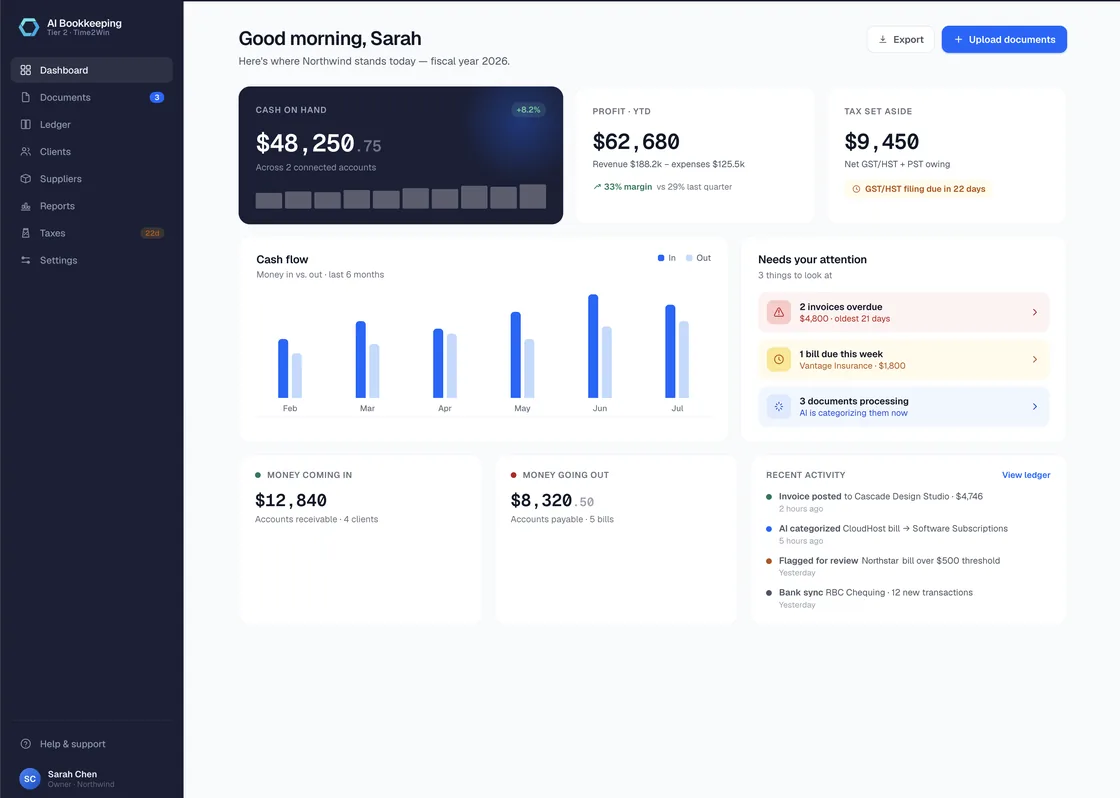
The Bookkeeping Service turns finished books into views you can read without knowing any accounting.
Cash
What you actually have across your connected business accounts.
Revenue
What the business has earned, period over period.
Expenses
Where the money went, grouped the way your accountant expects.
Profit
Profit to date and by fiscal quarter, from real books.
Money customers owe you
Client balances and aging, with statements of account.
Money you owe
Supplier balances and aging, so nothing is a surprise.
Taxes
Tax collected against credits for the current filing period, with CRA GST/HST deadlines tracked.
Reports
Profit & Loss and Balance Sheet as of any date, downloadable and printable.
Controls we can describe specifically.
Your financial records deserve more than a padlock icon. Here is what actually protects them.
Secure document handling
Financial documents are held in private storage reached only through expiring signed links. No public file URLs.
AI output is validated
No AI-proposed entry reaches your books without passing deterministic accounting rules first.
Human review of uncertainty
Entries the system can't confidently resolve are decided by trained staff, not posted on a guess.
Immutable audit trail
Nothing is edited in place. Corrections post as new linked entries, and every financial action is logged with who and when.
Account permissions
Owner, external accountant, and internal reviewer roles each see exactly what they should — no more.
Data isolation
Every organization's data is walled off, with permission rules covered by deny-path testing.
Secure bank connections
Bank and credit-card connections run through Plaid. The platform never sees your banking credentials.
Deletion and retention
When you delete a document or your account, the underlying files are erased from storage. Where the law requires specific records to be kept, they are retained for that period and no longer.
Time2Win Inc. is a Canadian corporation and handles personal information under PIPEDA. Payments are processed by Stripe; we never touch card data.
Software prices. Bookkeeper outcomes.
Bookkeeping Service
AI + human reviewEvery Bookkeeping Service plan includes the full workflow: AI processing, accounting-rule validation, human review when needed, reports, tax information, and accountant access.
Receipt Automation
Document processingPrices in CAD/USD. Taxes may apply. Cancel anytime — no cancellation fee, access to the end of the period.
Side by side.
| Capability | Receipt Automation | Bookkeeping Service |
|---|---|---|
| AI document processing | Included | Included |
| Automatic categorization | Expense categories | Full accounting treatment |
| GST/HST tracking | Input tax credits on receipts | Tax collected, credits, and filing periods |
| Full double-entry books | Not included | Included |
| Human review of uncertain entries | Not included | Trained reviewers on our staff |
| Bank and credit-card connections | Not included | Included, via Plaid |
| Stripe connection | Not included | Revenue and processing fees posted automatically |
| Reconciliation | Not included | Handled for you |
| Financial statements | Expense and tax reports | Profit & Loss and Balance Sheet |
| Receivables and payables | Not included | Client and supplier balances with aging |
| Financial visibility dashboard | Expense summaries | Cash, profit, taxes, and cash flow |
| Accountant access | Share exported files | Their own workspace, by invitation |
| Tax-time reporting | Annual Excel workbook | Full report package, plus workspace access |
| Excel export | Included | Included |
| Free trial | 5 documents, no credit card | 15 days, no credit card |
| Monthly price | $29 – $69 CAD/USD | $99 – $399 CAD/USD |
Built for owners whose time is
worth more than data entry.
Contractors and trades
Receipts from the lumber yard, the gas station, and the supply house — handled without an evening of typing.
Small businesses
Real books maintained during the year instead of reconstructed under deadline.
Startups
A clean, auditable history from day one, for the diligence conversation later.
Owner-operated companies
Incorporated, mixing personal and business cards, and short on time for any of it.
Already have an accountant
Keep them. We keep the books current so their work starts from finished records.
Questions owners ask
before signing up.
Something not covered here? Email support and a person will answer.
Upload your documents. Let the platform handle the bookkeeping.
Start with the Bookkeeping Service and see your books stay current — or begin with Receipt Automation and move up when you're ready.
No credit card required. Cancel anytime.